
Project
Handoff A11y - Annotation Kit
Handoff A11y - Annotation Kit
Handoff A11y - Annotation Kit
Project Overview
Improved the design-to-development handoff process by integrating accessibility standards into documentation, components, and implementation guidelines.
The goal was to ensure that accessibility was not lost during handoff, enabling teams to build inclusive products more efficiently.
Scope: Audit → Definition → Documentation → Handoff optimization
Focus: Accessibility + Design Systems + Developer collaboration
Project Overview
Improved the design-to-development handoff process by integrating accessibility standards into documentation, components, and implementation guidelines.
The goal was to ensure that accessibility was not lost during handoff, enabling teams to build inclusive products more efficiently.
Scope: Audit → Definition → Documentation → Handoff optimization
Focus: Accessibility + Design Systems + Developer collaboration
Problem
Accessibility was often lost during the handoff phase due to:
Lack of clear accessibility specifications in design files
Misalignment between design and development
Missing documentation for states, behaviors, and edge cases
Accessibility treated as a final check instead of a core requirement
This led to:
Inconsistent implementation
Accessibility issues in production
Increased rework and delays
This is a common challenge: accessibility requirements are often not embedded into workflows, causing gaps between design and implementation
Problem
Accessibility was often lost during the handoff phase due to:
Lack of clear accessibility specifications in design files
Misalignment between design and development
Missing documentation for states, behaviors, and edge cases
Accessibility treated as a final check instead of a core requirement
This led to:
Inconsistent implementation
Accessibility issues in production
Increased rework and delays
This is a common challenge: accessibility requirements are often not embedded into workflows, causing gaps between design and implementation
Research
To understand the handoff gaps, I conducted:
Design file reviews
Collaboration sessions with developers
Analysis of recurring implementation issues
Key Findings
Accessibility requirements were not clearly documented
Developers lacked guidance on behavior, states, and interactions
Components were visually defined but not functionally or semantically specified
No shared standard for accessibility in handoff
Research
To understand the handoff gaps, I conducted:
Design file reviews
Collaboration sessions with developers
Analysis of recurring implementation issues
Key Findings
Accessibility requirements were not clearly documented
Developers lacked guidance on behavior, states, and interactions
Components were visually defined but not functionally or semantically specified
No shared standard for accessibility in handoff
Design
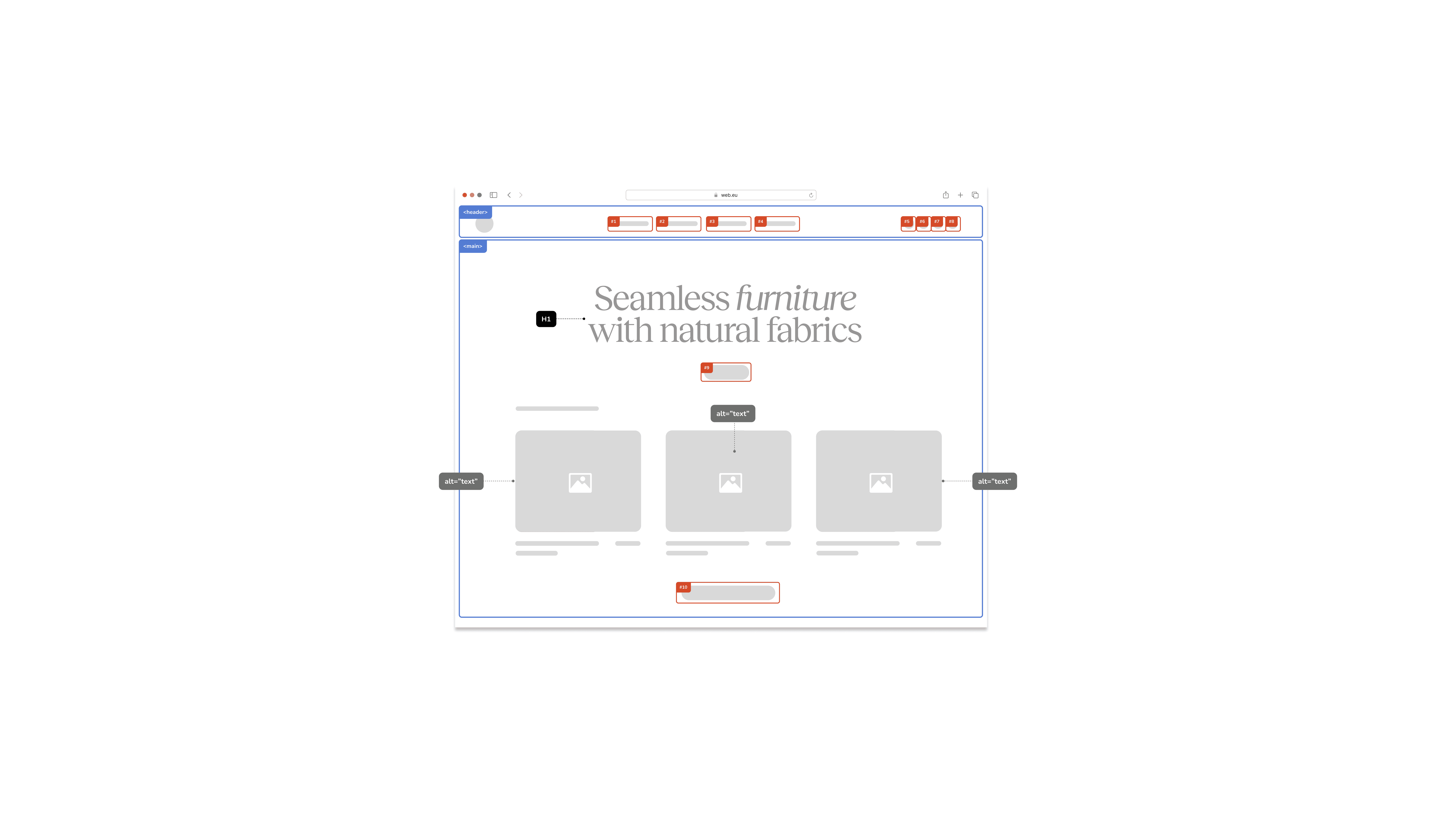
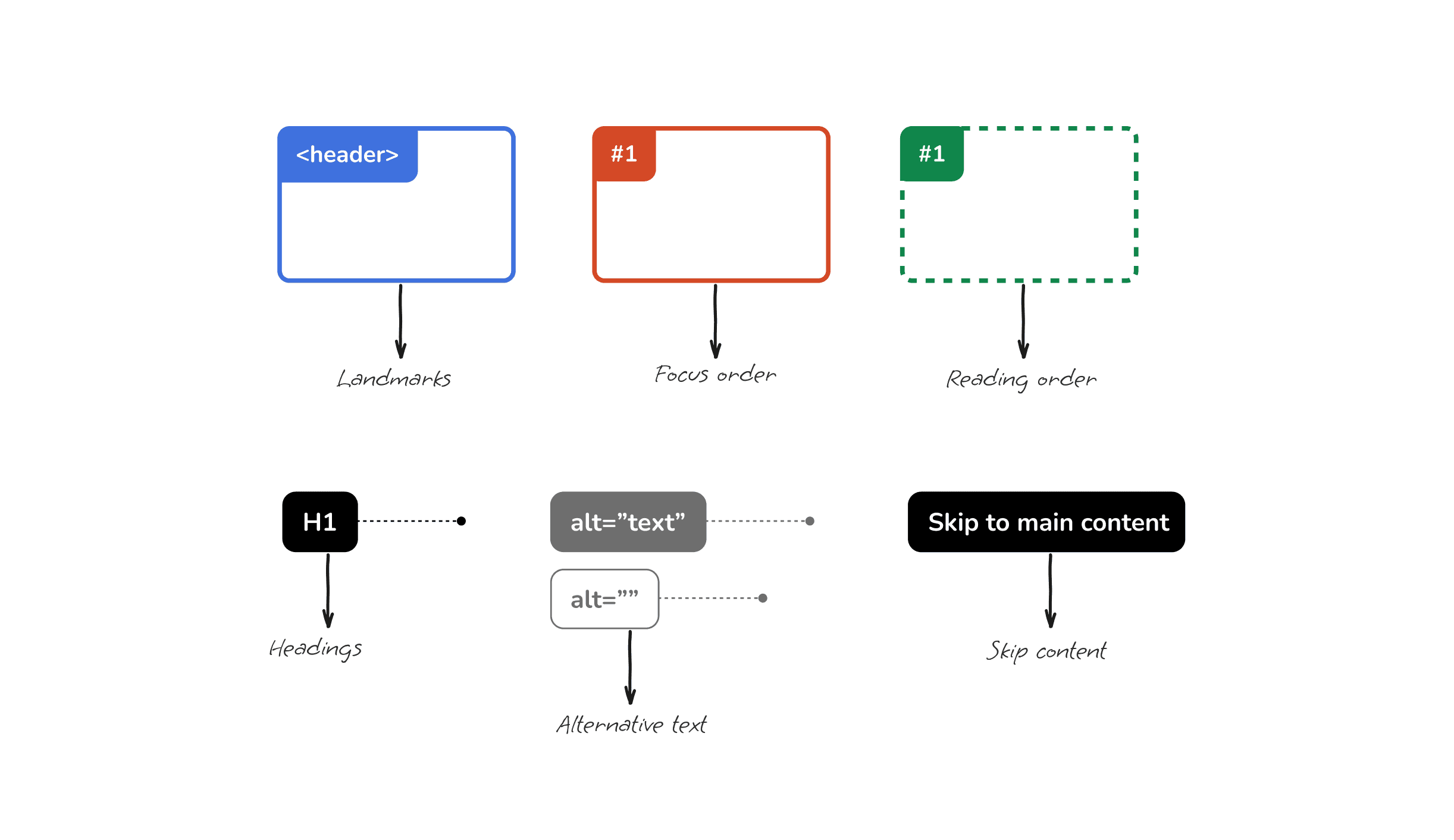
Based on our research, we designed a set of components with the goal of ensuring that accessibility requirements are considered from the design stage. The main aspects it addresses include:
Focus Order: Defines the order in which interactive elements should receive focus when navigating with a keyboard, ensuring a smooth experience.
Reading Order: Establishes the logical sequence in which content should be read by assistive technologies.
Landmarks: Identifies key content areas such as headers, footers, or navigation bars to facilitate recognition by assistive technologies.
Labels for Non-Text Content (alt): Provides descriptions or labels for images, icons, buttons, and other non-textual elements, ensuring they are understood by users with visual impairments.
Skip to Main Content: Includes guidelines for implementing a link that allows users to skip directly to the main content, avoiding repetitive navigation.
Heading Tags: Specifies the hierarchical structure of headings (h1, h2, h3, etc.) to enable coherent navigation and proper interpretation of content by screen readers.
Design
Based on our research, we designed a set of components with the goal of ensuring that accessibility requirements are considered from the design stage. The main aspects it addresses include:
Focus Order: Defines the order in which interactive elements should receive focus when navigating with a keyboard, ensuring a smooth experience.
Reading Order: Establishes the logical sequence in which content should be read by assistive technologies.
Landmarks: Identifies key content areas such as headers, footers, or navigation bars to facilitate recognition by assistive technologies.
Labels for Non-Text Content (alt): Provides descriptions or labels for images, icons, buttons, and other non-textual elements, ensuring they are understood by users with visual impairments.
Skip to Main Content: Includes guidelines for implementing a link that allows users to skip directly to the main content, avoiding repetitive navigation.
Heading Tags: Specifies the hierarchical structure of headings (h1, h2, h3, etc.) to enable coherent navigation and proper interpretation of content by screen readers.
Solution
Delivered an improved handoff process that:
Integrates accessibility directly into design documentation
Provides clear, actionable guidelines for developers
Reduces ambiguity in implementation
Ensures consistency across products
Accessibility became part of the workflow — not a final validation step.
Impact
Reduced implementation inconsistencies
Improved collaboration between design and development
Increased accessibility compliance in shipped features
Faster and more reliable delivery
Solution
Delivered an improved handoff process that:
Integrates accessibility directly into design documentation
Provides clear, actionable guidelines for developers
Reduces ambiguity in implementation
Ensures consistency across products
Accessibility became part of the workflow — not a final validation step.
Impact
Reduced implementation inconsistencies
Improved collaboration between design and development
Increased accessibility compliance in shipped features
Faster and more reliable delivery